

Most Tailwind debates pit Tailwind’s utility-first approach against outdated CSS workflows—comparing today’s tool against yesterday’s problems. The result? A rigged comparison that naturally favors Tailwind.
But here’s what’s missing from that debate: the development environment has changed and so has CSS. Modern visual development tools and proper CSS methodologies have evolved far beyond the monolithic stylesheet era that made Tailwind so appealing when it was first introduced.
In this article, we’re doing an apples-to-apples comparison: Tailwind against BEM-based CSS within a modern visual development environment (a properly-architected “page builder”).
As you’ll see, when you actually level the playing field, the picture becomes remarkably clearer. And you may find that the conclusions radically change.
Pre-Requisite: What is BEM?
BEM is a methodology for naming elements and selectors to keep CSS organized, consistent, and “flat” (low specificity). You can watch this video I recorded three years ago for a detailed lesson:
You don’t have to be familiar with BEM for this to be useful, but you should familiarize yourself if you intend to go the vanilla CSS route because BEM is pretty widely regarded as the simplest and most effective convention.
Tailwind Argument #1: Putting Style Instructions in Markup is More Efficient Than Stylesheets
Traditionally, developers would maintain separate files for markup (e.g. home.html) and styling (styles.css). You would write the markup for a hero section, for example, and then you’d then need to bounce over to your stylesheet to write the styling instructions for it.
And since you can’t perfectly style something without looking at it and understanding its structure, you’d need to constantly bounce back and forth, dozens or even hundreds of times.
Tailwind proponents are correct to suggest that this is both inefficient and cognitively disruptive.
“I can’t see my markup while I’m writing my styles.”
“I hate having to switch back and forth between markup and stylesheets over and over.”
“The stylesheet is getting really long and finding styles is a pain in the ass.”
Tailwind solves this problem by allowing developers to write styling directly in their markup. However, modern visual development environments have eliminated this pain point, making Tailwind’s solution less compelling.
Look at this screenshot from Etch, a modern visual development environment for WordPress:
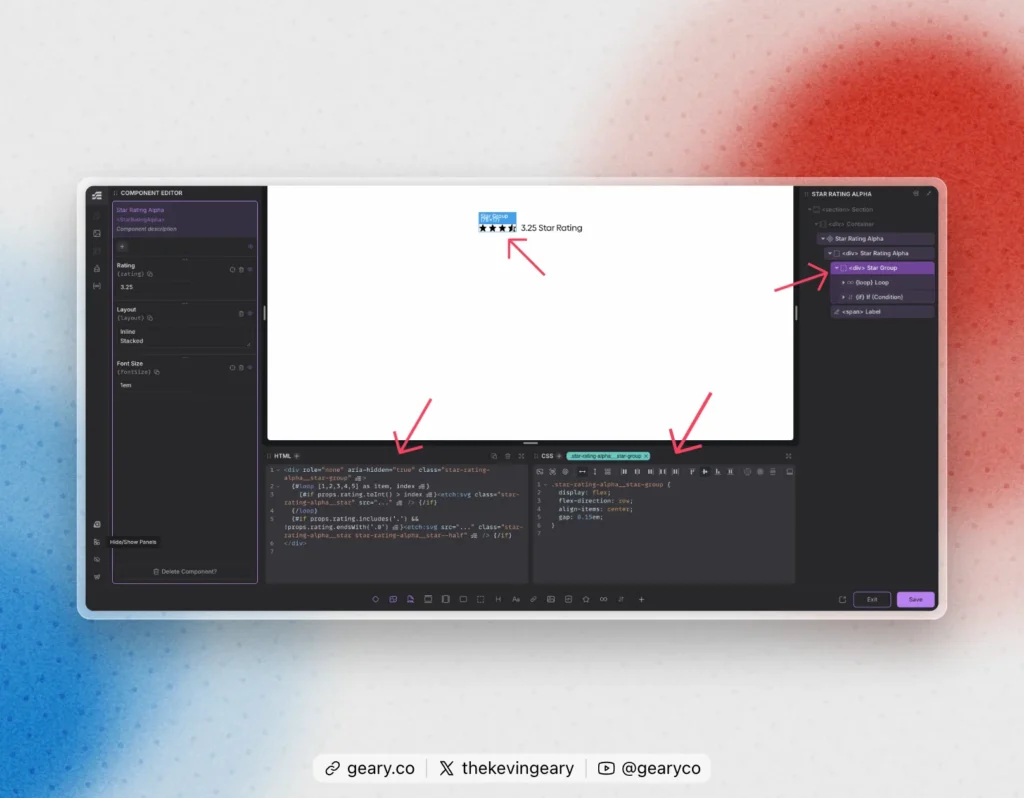
Etch’s interface and architecture has some unique advantages that have never existed in web development before. You might say I’m biased as one of the minds behind it, but anyone who has used it will tell you that this is an objective fact.
When you click an element on the canvas or from the structure panel, the HTML editor isolates that element’s HTML and its children.
Directly adjacent to that, is the isolated CSS for any selectors attached to that element and a “Quick Actions” bar for auto-generating CSS based on the preferred values for your project.
Not only do you see your markup and styling at the same time, it’s isolated to the element that you’re working on and isolated into individual panels, which dramatically reduces cognitive load and interpretation time.
In the above example, I’m working on a star rating component. When I click on the wrapper for the stars, I see the markup and styling for that specific wrapper.
Not only does this completely eliminate context switching, it actually makes styling and re-styling easier than Tailwind.
This is because isolated CSS is easier to read, interpret, and refactor than inline utility classes are, especially as styling gets more complex.
Putting all your styling in your markup with utility classes may solve context switching, but it creates a “class soup” that can be very difficult and time consuming to interpret and manipulate.
BEM-based CSS, when written in a modern visual development environment, makes scanning, interpreting, and refactoring easier than its ever been.
Winner: BEM + Visual Development Environment
Tailwind Argument #2: Writing Utility Classes is Faster Than Writing CSS
Writing flex-col is objectively faster than writing display: flex; flex-direction: column;. Nobody in their right mind is going to try to argue that it isn’t.
This is one of those arguments that Tailwind proponents suggest is an “irrefutable” advantage of Tailwind.
Not only can this argument be refuted, but the advantages largely disappear when compared fairly.
While Tailwind accelerates class writing, generating CSS automatically through visual tools eliminates the need to write it altogether—a more significant efficiency gain.
Again, instead of trying to memorize and learn an entirely new language and syntax for styling, I simply leverage the innovative workflow tools in my visual development environment.
Etch has multiple innovative tools that help me author CSS at speeds never before seen in web development:
- Auto BEM – Etch automatically generates BEM-compliant selector names based on your component structure in the structure panel. A single click produces both the naming convention and the CSS scaffolding.
- CSS Quick Actions (“Mini GUI”) – There are visual icons for all the properties I want to add, and clicking them gives me exact values that I want. The CSS is authored for me just by clicking buttons.
- Recipes – Etch includes pre-built CSS patterns (referenced with terms like
?content-grid,?variable-grid, or?fade-block) that expand into anywhere from 2 to 200 lines of production-ready CSS, handling both common and complex styling scenarios. - Nesting – Etch uses native nesting so that users can tackle pseudo elements, hovers, media queries, container queries, and lots of other scenarios without any additional selectors and without losing the compartmentalization of the CSS.
- Auto-wrapping for var() and calc() – I never have to write
var()orcalc()functions. I just write the variable name or the formula and Etch automatically creates the function. - Auto Container Query & Media Query Insertion – A single click of the button inserts a nested container query or media query. Even better, it inserts it with the proper value based on the current measurement of the dynamic canvas (for media queries) or the selected element (for container queries).
None of these innovations existed before, and none of them are ever discussed in the classic Tailwind vs BEM debates.
As you can see, when you talk about Tailwind vs BEM in the proper context, all the advantages of Tailwind start to fall apart.
Winner: BEM + Visual Development Environment*
*Caveat: The Etch team will be designing a Tailwind workflow that leverages Etch’s Mini-GUI to insert Tailwind Classes based on your Mini-GUI interaction. It’ll be the fastest approach to writing Tailwind classes that’s ever been seen. So if this article doesn’t convince you that BEM is better than Tailwind, rest assured that Etch will still be the best development environment for Tailwind users that’s ever been engineered.
Tailwind Argument #3: Naming Things is Hard – You Don’t Have to Name Anything With Tailwind
Ask any developer if naming things is hard and they’ll probably nod their head, “Yes.” And while I’ve said the same thing myself many times (including in video tutorials), the truth is that naming things is only difficult in a relatively small number of situations.
For the most part, patterns tend to repeat on the internet and once you have a little bit of practice with naming things, most of the naming patterns show up over and over again.
But that’s not even the best counter argument. The best counter argument is a three-fold argument:
- You still have to name things in Tailwind.
- Naming things is critical to project workflow.
- The concept of *not* naming things is kinda dumb.
Let’s tackle these one by one:
You still have to name things in Tailwind.
Tailwind relies on a component-based development architecture. It’s the only way to make Tailwind a relatively sane option.
Are the Tailwind proponents trying to suggest that they don’t have to name their components and component files? Of course they have to name them. And whatever names they choose could have been used as the BEM names for those components.
Remember, it’s the block name in BEM that’s usually the hardest. That’s the same as the component name. The elements inside a block are usually pretty literal and obvious, so those aren’t hard once you’ve figured out the block name.
Of course, TW proponents will say, “But we don’t have to write all those selector names.” To which I reply, “Me either. I have Auto-BEM (generate all selectors automatically in one-click).”
Naming things is critical to project workflow.
Let’s talk about two aspects of a visual development environment that are far superior to a typical IDE (code editor):
- An interactive canvas
- An interactive structure panel
Here’s a peek at Etch’s structure panel and canvas:
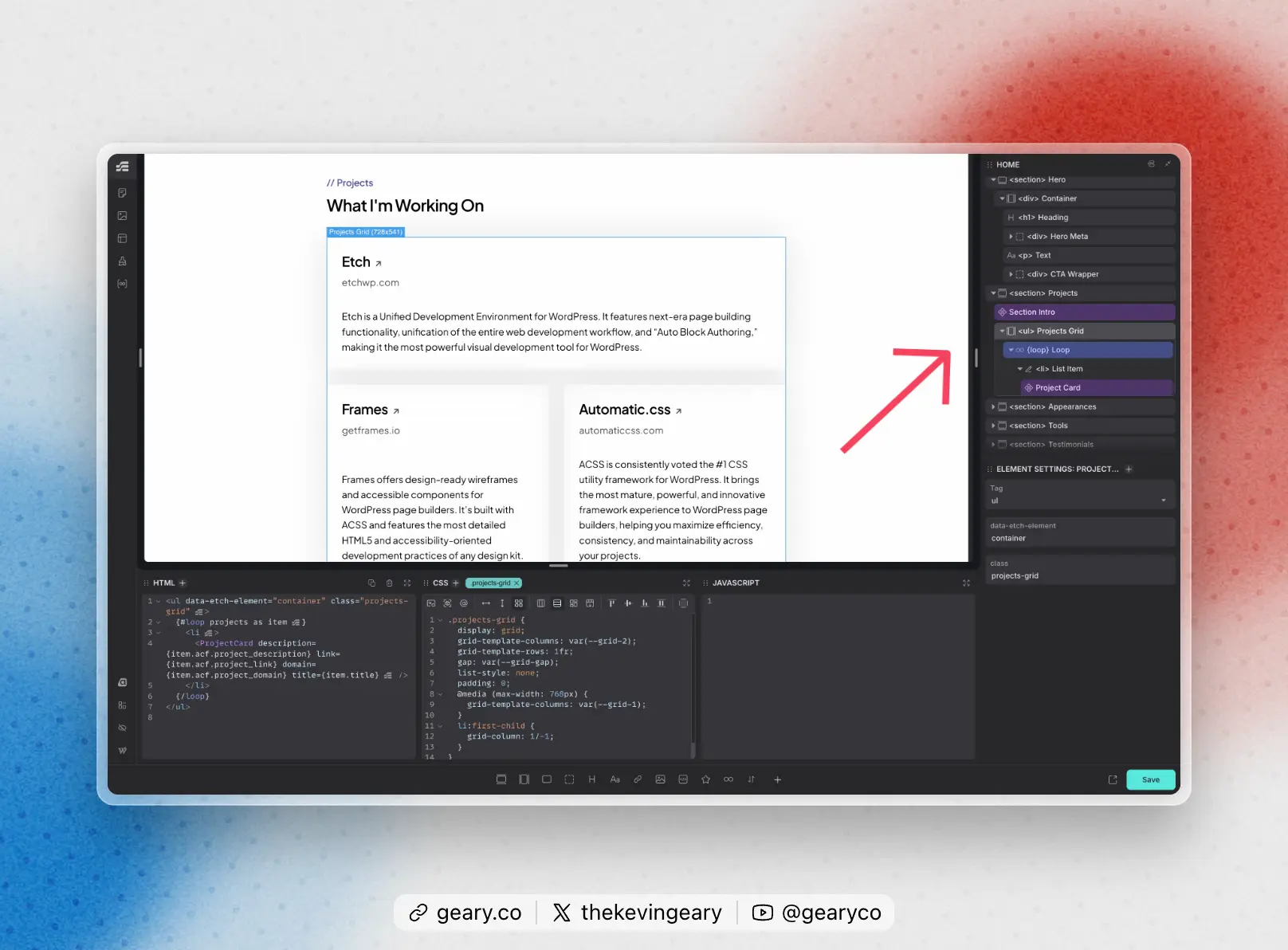
In a visual development environment, you have the advantage of clicking on an element you want to work on, either by selecting it directly on the canvas or by clicking its block in the structure panel.
When your structure panel has logically named elements, this process is even faster.
In an IDE, you have to quickly scan code to find the thing you want to work on. It’s slower and more cognitively expensive. And guess what? In Tailwind it’s hyper-expensive because none of the elements have names and the markup is exponentially more complex because it’s littered with utility classes.
That brings me to…
The concept of *not* naming things is kinda dumb.
What Tailwind markets as an advantage actually becomes a liability. Without element names anywhere in markup, locating specific components and sub-elements becomes tedious and error-prone.
Imagine a complex card with elements nested 3-4 levels deep. In a tool like Etch, you click the element or its name in the structure panel and you’re instantly given an isolated code view without batting an eye.
This is particularly valuable when team members inherit code they didn’t write. Without semantic names, debugging and modifying existing Tailwind markup requires significant mental overhead to parse the class-heavy structure and locate the correct elements.
The bottom line: While naming things is *sometimes* hard, naming things is way better than not naming things, especially when you’re working in a visual environment that gives you instant clarity on your structure and instant access to any named element.
Winner: BEM + Visual Development Environment
Tailwind Argument #4: Tailwind Creates a Standard That’s Easy for Developers to Follow
Tailwind is a CSS framework.
Here’s the kicker that you might not realize: it’s not the only framework!
Automatic.css is also a CSS framework (though very different in theory and execution since it’s a variable framework and not a utility-class framework).
The point here is simple, though. Opinionated frameworks, and disciplined adherence to them, are what create a standard. Tailwind isn’t the only option for doing this!
BEM is a mental framework. It’s a consistent and repeatable approach to naming things, organizing CSS, and managing specificity.
ACSS serves as the standard for tokenizing project values.
And you can teach BEM and ACSS way faster and easier than teaching a proprietary, heavily abstracted, heavily abbreviated, standards-deviated framework like Tailwind.
You read that right. I said “standards-deviated framework like Tailwind.”
While Tailwind advocates position it as a “new standard,” it actually represents a departure from established web standards. It requires custom build processes, introduces implementation workarounds, and challenges the traditional separation of concerns principle that has long guided development practices.
Want to know what solved all the problems with traditional CSS without having to introduce some entirely new and convoluted approach to styling? Modern visual development environments.
We changed the environment instead of the language. All the problems went away and now we can get the most from the vanilla spec without jumping through 1000 hoops and adopting an entirely new model that comes with a significant learning curve and a long list of cons (more on that in a moment).
Winner: BEM + Visual Development Environment
Tailwind Argument #5: JIT Compiling Makes Projects Insanely Lightweight
Tailwind has thousands of base utility classes and is infinitely expandable based on how a user sets up the config file.
In a normal CSS environment, this would spell disaster for performance. Thankfully, Tailwind offers “just in time” (JIT) compiling, which scans your code for classes used and only loads the CSS for those classes.
And since all your styling is based on utility classes, it doesn’t matter how many times you need flex-direction: row, that CSS property is only loaded once.
Tailwind is extremely performant. That’s probably its best feature. But, once again, modern visual development environments step up to compete.
When you write CSS in Etch, you’re not writing CSS to a global stylesheet. Rather, you’re writing CSS to a selector attached to an element within a dynamic selector system.
Guess what this selector system does? It tree-shakes in very similar fashion to JIT. It scans the page for selectors you actually used and only loads the CSS for those selectors.
This eliminates TONS of unnecessary CSS for a given page and dramatically improves performance.
Now, if you have multiple blocks on the same page that set flex-direction: column, for example, then those rules will show up multiple times. This is less efficient than Tailwind. But, once the major tree-shaking is done, the small amount of duplication that’s left over is inconsequential and most likely incalculable from a performance perspective.
Most Tailwind comparisons pit its JIT compiler against legacy global stylesheets—an extremely unfair comparison. When measured against Etch’s dynamic selector system, which similarly eliminates unused CSS, Tailwind’s performance advantage becomes marginal.
Winner: Tailwind (but it’s really just a participation trophy at this point)
Bottom Line: Are The Advantages of Tailwind Worth the Costs?
Before modern visual development environments emerged, Tailwind’s value proposition was considerably stronger. This article focuses specifically on how Etch and similar visual environments change that calculus.
With all the major problems of vanilla CSS solved by things like Etch, BEM, and Automatic.css, the Tailwind pros and cons list seems to tip heavily toward being mostly a cons list.
Tailwind Cons
- Complex abstraction requiring another major learning curve.
- Requires more “lookups” to stay consistent. Instead of using t-shirt based tokens for things like spacing, typography, etc. which have configurable values, you have to constantly look up which utility classes are being used as the standard for any given project.
- Requires a major deviation from traditional workflows.
- Requires components in many areas where BEM doesn’t, opening the door for “over-componentization.”
- Hard to make sweeping style changes.
- Hard to read, decipher, and iterate existing elements.
- Relies heavily on multi-cursor and find/replace workflows, which are more unpredictable, time-consuming, and error-prone than BEM modifications.
- Doesn’t handle everything gracefully. Users often still write custom CSS for many complex scenarios.
- Makes diff assessments tremendously noisy, since all styling changes show up as markup diffs.
- Requires a build step (which isn’t necessary in a tool like Etch – and if your project already requires a build step, this is a non-issue).
Remember, we’re not comparing a “no cons” framework with BEM. Tailwind has plenty of cons you must consider.
Of course, BEM is not perfect either. There’s no perfect solution. All I’m pointing out is that the debate between Tailwind and BEM has radically changed because (1) CSS has evolved a lot and (2) our development environments have radically improved.
We’ve entered a new era of development. With modern visual environments, proper CSS methodologies, and evolved standards support, BEM offers compelling advantages that merit reconsideration in this debate.
If you’re a Tailwind fanatic or your entire agency is heavily invested in Tailwind, you may not want to switch. But for people weighing one workflow against the other because they’re unsure, I would personally recommend the BEM + ACSS (Variable First Framework) + Unified Development Environment workflow.
Want to chime in? Reply to this article on X.